Speedometer: GPS Speedometer
Simple Design Ltd.Maps & Navigation
4.65.02K Reviews
- Version
- 1.2.8
- Installs
- 10.00M
- Age Rating
- Everyone
Screenshots
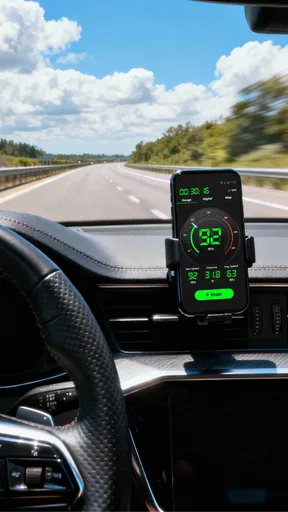
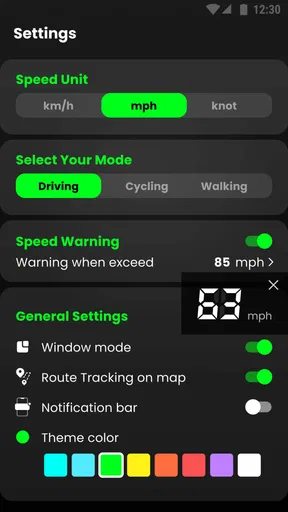
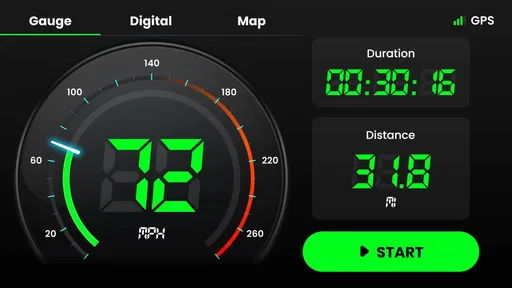
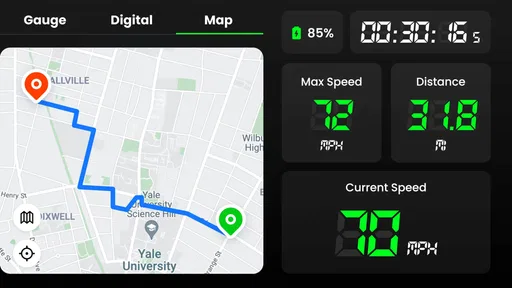
Our Review of Speedometer: GPS Speedometer
 Analysis by Appyee
I reach for a GPS speedometer when I want a second way to check how fast I’m moving, not a replacement for paying attention to the road. That practical role is the best way to think about Speedometer: GPS Speedometer: it turns a phone into a travel instrument for speed and distance, with extra tools that may suit some trips better than others. I find the idea most useful when I want a quick independent reference, or when I’m travelling in a vehicle without a speed display that is easy to read.
What the free access does—and doesn’t tell you
The app is free to download, which makes trying its basic appeal a low-commitment choice. It also offers in-app purchases priced from $4.49 to $49.99 per item. I would separate those two facts when deciding whether it represents good value: free access lets you assess whether the speed and distance tools fit your routine, while the listed purchase range alone does not tell you which paid option is useful or what it adds. I wouldn’t spend money simply because an upgrade is offered; I’d first decide whether I need a specific extra.
That distinction matters because a speed readout is easy to compare with tools many drivers already have. A car’s built-in speed display is usually the more convenient choice while driving, and a navigation app may make more sense when the main task is choosing a route. This app’s value is different: it puts speed and distance in the foreground, with a speed-limit check and time as part of its stated purpose. If that is the information you want at a glance, its focused approach may be worth a try; if you need turn-by-turn guidance, it is not a substitute for a navigator.
Where a separate speed display earns its place
I can see this being handy on a bicycle or in an older vehicle where the dashboard is hard to read, provided the phone is mounted safely and the device can get a usable GPS signal. It can also give a passenger a simple way to follow a journey’s speed and distance without needing to open a full map. Those are modest jobs, but they are exactly the sort of jobs for which a dedicated display can feel less distracting than switching between several screens.
A useful habit is to check the app’s reading against the vehicle display while stationary or during a safe pause, rather than trying to compare screens as you drive. GPS readings depend on signal conditions, so buildings, tunnels, and other obstructions can affect the result. Treat the app as a helpful reference, not as a certified instrument or a reason to look down repeatedly. If you are driving, set up the phone before moving and keep your attention on the road.
The practical trade-offs to consider
GPS-based speed tracking brings a different set of trade-offs from a dashboard sensor: it needs a suitable signal, and using GPS for a long journey can draw on the phone’s battery. A charger can help on a long drive, but it adds another item to manage and may not be convenient on every ride. If you mainly want to glance at speed for a short trip, that may be a fair compromise; if you need continuous tracking throughout a long day away from power, battery use deserves more thought.
There is also a safety trade-off with any phone-based instrument. A large, clear display can be useful, but customizing screens or checking a trip log while moving is not. I’d make any choices before setting off and leave adjustments until a safe stop. A speed-limit warning can support awareness, but it should not be treated as a guarantee that the displayed limit is correct for every road or that the app will replace signs and local rules.
Who is most likely to get value
This is most appealing to someone who wants a simple speed-and-distance companion, occasionally needs a clearer readout than the vehicle provides, or likes having a separate GPS reference on a trip. It is less compelling for a driver whose dashboard already does the job, or for anyone looking for maps, route planning, live traffic, or a complete navigation system. I’d also steer away from relying on it where a GPS signal is predictably poor or where using a phone display would create a distraction.
In everyday use, imagine setting off for a drive across town and wanting to keep an eye on speed without opening a map. I’d mount the phone before leaving, choose the display that is easiest to read, and let the app do one job while I focus on driving. If I wanted to check how far I had travelled, I’d review that after parking rather than interact with the screen on the move. That simple workflow is more useful than trying to make a phone handle every task at once.
How it compares with familiar alternatives
Compared with a car’s speedometer, a phone app offers portability but depends on GPS and competes for battery and attention. Compared with a navigation app, it puts speed and trip information first rather than making routes the centre of the experience. That focus is a genuine advantage if you want a glanceable instrument, but a disadvantage if you expect directions or a map-led journey. I’d keep the vehicle display as my primary reference when it is available and use this app as a supplement, not as a universal replacement.
For cyclists, passengers, or people checking distance on a journey, the balance can be different: portability may matter more than integration with a dashboard. Still, phone placement and local rules matter, and the app does not make unsafe handling safe. Before relying on it for a particular trip, I’d check that the screen remains readable in the intended position and that the signal is steady enough for the use I have in mind.
Getting Started with Speedometer: GPS Speedometer
First things first, downloading the Speedometer: GPS Speedometer app was a breeze. Available on both Android and iOS, it didn’t take longer than a minute to install. Once installed, the app greets you with a sleek, user-friendly interface that screams simplicity. No clutter, no overwhelming options — just straightforward functionality. It’s perfect if you’re like me and prefer apps that don’t require a manual to operate.
Interface and Usability
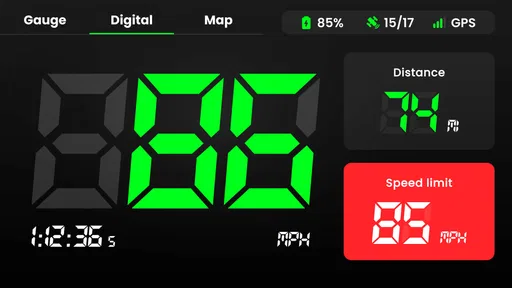
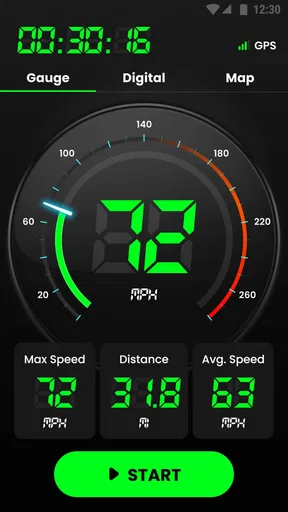
The design is minimalistic, yet effective. You get a clear digital readout of your speed, and it’s easy on the eyes. The app displays speed in various units like MPH, KMH, and knots, which is pretty neat for those who might switch between driving a car and piloting a boat. I found the transition between units smooth, with just a few taps.
One feature that caught my eye was the customizable display. You can change the background color, tweak the speedometer style, and even set up a speed limit warning. The app will alert you if you’re going over your preset limit, which is pretty handy for avoiding those pesky speeding tickets. It’s like having a speed guardian watching over your shoulder.
Performance and Accuracy
Now, onto the real test — accuracy. I took the app for a drive around town and compared it with my car’s built-in speedometer. Surprisingly, the Speedometer: GPS Speedometer was spot on. It uses GPS to track your speed, and the precision was impressive. Even when I was in areas with sketchy GPS signals, the app held its ground.
One thing to note is that the app does require GPS to function, so it’s not going to work well if you’re underground or in a tunnel. But on open roads, it’s as reliable as your morning coffee.
Additional Features
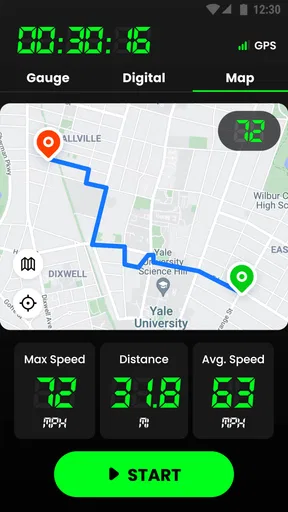
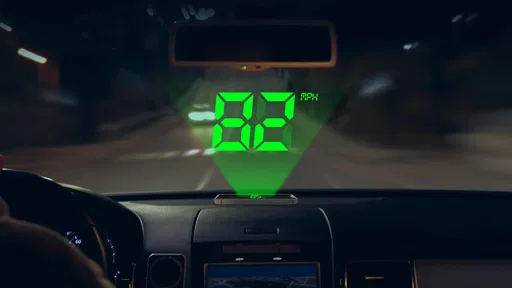
The app isn’t just a one-trick pony. It offers a trip log feature, where you can record your journey details. This feature is perfect for road trips or when you need to keep track of distances traveled for work. There’s also a heads-up display (HUD) mode, which projects the speed onto your windshield if you’re driving at night. It’s a cool feature, though I found it a bit more gimmicky than practical.
There’s also a compass and an altimeter included, which might come in handy for off-road adventures. I didn’t use these features extensively, but it’s nice to know they’re there.
Battery Usage
One concern with GPS apps is battery consumption. The Speedometer: GPS Speedometer does use a fair bit of juice, especially on long trips. However, it’s manageable if you have a car charger handy. Just something to keep in mind if you’re planning a day-long drive.
Final Thoughts
All in all, the Speedometer: GPS Speedometer app is a solid choice for anyone needing a reliable and easy-to-use speedometer. It’s packed with features that are both practical and fun, and its accuracy is commendable. Whether you’re a road warrior or just someone who likes to know their speed, this app is worth checking out.
As a Maps & Navigation app from Simple Design Ltd., it has a clear, narrow purpose rather than trying to be a full travel suite. Its average rating is 4.5 from around 152,000 ratings, and it has more than 10 million installs. Those figures suggest broad interest, but I’d still judge it by whether GPS speed and distance are useful for your own trips. It is free to install, rated for Everyone, and currently at version 1.2.5; it requires Android 6.0 or later on Android devices.
The trip log is best treated as a post-journey reference, not something to manage while moving. For work travel, for example, I’d start a recording before leaving, keep the phone secured, and review the distance after parking. That small routine can make the feature more useful without turning a drive into a series of screen checks. If your records have to meet a formal reimbursement or business standard, I’d confirm that the app’s log suits that process before depending on it.
The speed warning is similarly most useful when configured before departure. I’d set a sensible threshold for the kind of road I’m using, then treat an alert as a prompt to reassess my speed rather than as an instruction to react abruptly. A warning cannot account for every change in road conditions, posted limits, or temporary restrictions. The driver remains responsible for checking signs and driving safely.
For a boat or an off-road outing, the knots option, compass, and altimeter may make the app more interesting than a standard car-only speed display. Even so, I would not assume that those additions make it a specialist marine or navigation instrument. Their value is in offering extra context on a phone; if a trip depends on purpose-built equipment, I would use the appropriate dedicated device instead.
One practical question is whether it can be used without a strong signal. Its speed measurement relies on GPS, so open sky is the sensible place to expect the most dependable experience. I would allow the phone a moment to establish its position before moving, and I would avoid judging a brief fluctuation as a meaningful change in speed. In a tunnel or underground section, I’d fall back on the vehicle’s own display rather than expect the app to maintain a useful reading.
Another consideration is whether this is a sensible first choice for a new driver. It can provide a visible reference and a preset warning, but it should not become a substitute for learning to read the dashboard, watching the road, or understanding speed-limit signs. A new driver who already has a clear vehicle speedometer may gain little from adding another screen. Someone whose dashboard is difficult to read could find the larger phone display helpful, as long as it is mounted securely and used without distraction.
The app is also not an obvious choice if your main reason for downloading is to plan a journey. It is not presented as a route planner, and its core appeal is measuring movement rather than finding a destination. I’d use a navigation app when I need directions and choose this one when I specifically want speed and distance information in a simple format. Keeping those jobs separate can be more convenient than expecting one app to do everything.
Making the choice
Overall, I’d try it if I had a clear use for a separate GPS speed display, especially for occasional trips, a hard-to-read dashboard, or distance tracking that I can review once stopped. The free download makes that trial straightforward, while the in-app purchase range means I’d check the actual options in the app before deciding whether any paid feature is worthwhile. I would skip it if my existing speedometer already gives me what I need, if I’m looking for full navigation, or if I cannot mount and use a phone safely. For the right narrow task, it is a practical companion; for everything else, the usual dashboard or a dedicated navigation app is the better fit.
Ready to take it for a spin? You can download the app from the links below and see for yourself how it transforms your driving experience. Just remember to keep your eyes on the road and not glued to the app!
Privacy and Permissions
See what permissions an app requests and how it handles your data.
- Location
- approximate location (network-based), precise location (GPS and network-based)
- Photos/Media/Files
- read the contents of your USB storage, modify or delete the contents of your USB storage
- Storage
- read the contents of your USB storage, modify or delete the contents of your USB storage
- Other
- view network connections, full network access, run at startup, draw over other apps, control vibration, prevent device from sleeping
Verdict
Strengths of Speedometer: GPS Speedometer
- Accurate speed tracking in real-time.
- Simple and easy-to-use interface.
- Customizable display options available.
- Works offline without data usage.
- Battery-efficient for longer trips.
Limitations of Speedometer: GPS Speedometer
- Ads can be intrusive at times.
- Limited features in the free version.
- GPS signal may vary in tunnels.
- Not compatible with all devices.
- No integration with fitness apps.
Other Releases by Simple Design Ltd.
View All
Video Downloader - Downloader
Video Players & Editors4.7

Fonts Keyboard Themes & Emoji
Personalization4.7

Image to PDF - PDF Maker
Productivity4.9

Document Reader - PDF Editor
Productivity4.7
Similar Picks in This Category
View All
Uber - Request a ride
Uber Technologies, Inc.4.7


inDrive. Rides with fair fares
® SUOL INNOVATIONS LTD4.8

Yandex Go: Taxi Food Delivery
Mikromobilnost LLC Belgrade4.8

Bolt: Request a Ride
Bolt Technology4.8

Rapido: Bike-Taxi, Auto & Cabs
Rapido Bike Taxi4.8
Frequently Asked Questions
What features does the Speedometer: GPS Speedometer app offer?
The Speedometer: GPS Speedometer app provides a real-time speed tracking feature using GPS technology. It includes customizable speed limits, HUD (Head-Up Display) mode, trip statistics, and an odometer. The app is designed to work offline, ensuring accuracy without an internet connection, making it ideal for driving, cycling, or running.
Is the Speedometer: GPS Speedometer app accurate without an internet connection?
Yes, the Speedometer: GPS Speedometer app is designed to function accurately without an internet connection. It utilizes GPS satellites to determine your speed, ensuring consistent performance. However, the accuracy can depend on the GPS signal strength, which might be affected by tall buildings or remote areas.
Are there any in-app purchases in the Speedometer: GPS Speedometer app?
The app may offer in-app purchases to enhance user experience. These could include premium features like ad removal, advanced customization options, or additional themes. Users can decide whether to purchase these extras based on their preferences and needs, allowing for a tailored app experience.
Can I use the Speedometer: GPS Speedometer app for activities other than driving?
Absolutely! The Speedometer: GPS Speedometer app is versatile and can be used for various activities such as cycling, running, or even hiking. Its real-time speed tracking and trip statistics are useful for anyone looking to monitor their speed and distance across different modes of transportation or activities.
How does the HUD mode work in the Speedometer: GPS Speedometer app?
The HUD (Head-Up Display) mode in the app projects the speedometer display onto your vehicle's windshield. By placing your phone on the dashboard, the reflection allows you to view your speed without taking your eyes off the road. This enhances safety by minimizing distractions while driving.
